A useful WebRTC leak test compares two observations from the same browser session: the public address seen by the webpage request and a public address surfaced while WebRTC gathers ICE candidates. A different address is worth investigating, but it does not identify the cause by itself. A matching address means only that this run did not reveal a different public address.
Run the live WebRTC leak test before following the interpretation guide below.
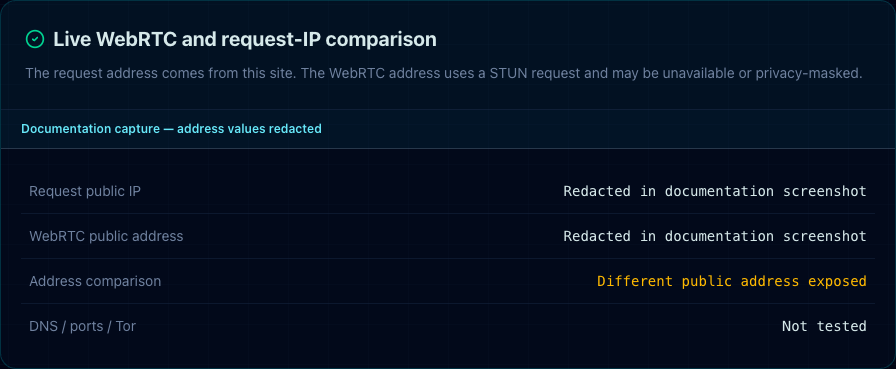
Real BrowserCheck capture from August 30, 2026. Both address values were deliberately redacted before the image was saved.
What BrowserCheck actually tests
The test performs three bounded steps:
- The page requests the first-party BrowserCheck network endpoint. The server reports the public address associated with that request.
- The browser creates an RTCPeerConnection data channel and asks a STUN server for ICE candidates. BrowserCheck waits up to four seconds for a server-reflexive candidate.
- If both public addresses are available, BrowserCheck normalizes and compares them. It reports match, mismatch, or not tested; it does not assign a safety score.
The W3C WebRTC specification explains that ICE candidate gathering can expose additional network context and that browsers may filter which addresses an application receives. MDN's ICE candidate type reference describes a server-reflexive candidate as a NAT mapping learned through STUN.
Reproducible test record
For the screenshot above, we used this recorded procedure:
| Field | Recorded value |
|---|---|
| Capture time | August 30, 2026 at 02:17 China Standard Time |
| Browser | Headless Chrome 151 |
| Platform | macOS |
| Page | BrowserCheck browser leak test |
| Result | Different public address observed |
| Address values | Redacted before saving |
| Explicitly not tested | DNS leaks, open ports, VPN detection, Tor detection |
The redacted machine-readable record is available at webrtc-leak-test-record.json. The repository script that reproduces the capture is scripts/capture-webrtc-guide.mjs.
This is one test in one environment. It is evidence that the test path produced a mismatch on that run, not evidence that Chrome, macOS, a specific VPN, or another product always behaves the same way.
How to interpret each result
Same public address
BrowserCheck did not observe a different public address in the server-reflexive candidate collected during this run. That is narrower than “no leak.” The browser may have filtered candidates, the network may expose only one route, or another leak category outside this test may still exist.
Different public address
The WebRTC candidate and the page request used different public addresses. Possible explanations include VPN or proxy routing differences, split tunneling, browser policy, extensions, or a multi-interface network. The comparison cannot determine which explanation is correct.
No comparable address
This is not a pass. It means one side of the comparison was unavailable. STUN may be blocked, the browser may suppress candidates, the connection may time out, or the first-party network endpoint may not return an address.
A safe manual test procedure
- Record the browser family and major version without publishing the full User Agent.
- Open the BrowserCheck leak test in a normal tab and wait until the status stops changing.
- Record only the comparison state—same, different, or unavailable. Do not paste either public address into a forum or issue report.
- If you use a VPN and a mismatch appears, consult that VPN vendor's current WebRTC or split-tunneling documentation. Avoid assuming that a generic browser switch is correct for every product.
- Retest after one change at a time. Changing the VPN, browser profile, and extensions together makes the result hard to diagnose.
What to do after a mismatch
- Confirm that the VPN or proxy is expected to carry WebRTC traffic, not only ordinary HTTP traffic.
- Review browser and extension settings using current vendor documentation. Disabling WebRTC globally can break calls, conferencing, screen sharing, and peer-to-peer applications.
- Test a clean browser profile to see whether an extension changes candidate handling. Do not add multiple “leak protection” extensions at once; extensions add code and can alter the browser's fingerprint.
- For a threat model that requires stronger network anonymity and fingerprint standardization, review Tor Browser's official protections and keep its defaults intact.
Limits of this guide
BrowserCheck does not test DNS resolvers, IPv6 routes beyond the observed comparison, open ports, malware, extension safety, VPN ownership, Tor use, or whether an account has already identified you. The test also makes a STUN request, so a STUN service participates in candidate discovery.
The W3C specification notes a real privacy-versus-connectivity trade-off: limiting available candidates can reduce address exposure, but it can also prevent the most direct connection path. A test result should therefore be interpreted as an observation, not a universal browser grade.
Sources and review notes
- WebRTC 1.0: revealing IP addresses — W3C
- RTCIceCandidate type — MDN
- WebRTC IP address handling requirements — IETF RFC 8828
- Tor Browser fingerprinting protections — Tor Project
Review method: BrowserCheck Engineering compared the article against the current test implementation, ran the production test, saved a redacted test record, and verified that the screenshot contains no address values. Last reviewed August 30, 2026.